Learn Drum - Beat Maker & Pad
- 3.8
- Rating
- 1.00M
- Installs
- Free
- Price
 Analysis by App-foxy
I approached Learn Drum - Beat Maker & Pad as a quick way to practice rhythm rather than as a replacement for a full electronic drum kit. It is a free music and audio app from SCA Software, built around guided drum learning and beat creation. That combination makes it more interesting than a simple collection of tapping pads: you can work through a lesson, then use the same basic idea to experiment with your own rhythm.
My overall impression is positive, with an important qualification. This is best suited to beginners, casual beat makers, and anyone who wants a low-pressure practice tool on a phone. It is less convincing for experienced drummers who need detailed notation, realistic hardware response, recording depth, or the expressive control of a physical kit. The app’s appeal comes from accessibility, not from trying to reproduce every part of a professional setup.
How the current version feels in everyday use
The current version is 1.0.9, and the app has already reached more than a million installs. That gives it a useful level of visibility for a focused learning tool, although the average score of 3.8 from roughly 869 ratings suggests that the experience will not satisfy every type of user. I read that rating as a sign to keep expectations practical: it is worth trying, but it should be judged as a compact mobile learning app rather than a complete studio.
You May Also Like

 Blood Strike: 2.5 Anniversary
Blood Strike’s Loadouts Turn Every Drop Into a Tactical Gamble
A close look at Blood Strike’s custom loadouts: how fast access to signature weapons reshapes its battle royale rhythm, rewards preparation, and narrows the gap between fights.

 Pandora - Music & Podcasts
Pandora’s Music Is Easy to Start, but Harder to Recover
Pandora’s strength is its low-effort path from a seed to a station. Its weak spot is how much confidence it asks you to place in connection, setup, and quiet recovery.

 8 Ball Pool
 Is Built on Rivalries, Rematches, and Routine
A close look at the rivalries, rematches, shared routines, and unanswered safety questions that turn a quick pool match into a persistent mobile community.

 Samsung Music
’s Quiet Strength Is Playing What You Already Own
Its reach comes less from spectacle than from dependable access to a personal library. That simplicity is both the app’s strongest retention engine and its ceiling.

 AccuWeather: Weather Radar
AccuWeather Review: A Quick, Clear Forecast for Everyday Decisions
For everyday plans, the best forecast is the one you can understand quickly. AccuWeather makes rain timing, radar, and local conditions easy to act on, with a few trade-offs.

 Hill Climb Racing
Why Hill Climb Racing Still Turns Crashes Into One More Run
A tiny car, a bumpy hill and one more upgrade: Hill Climb Racing keeps resurfacing because its simple chaos makes every near-miss feel personal.
More From Our News Desk
View All News


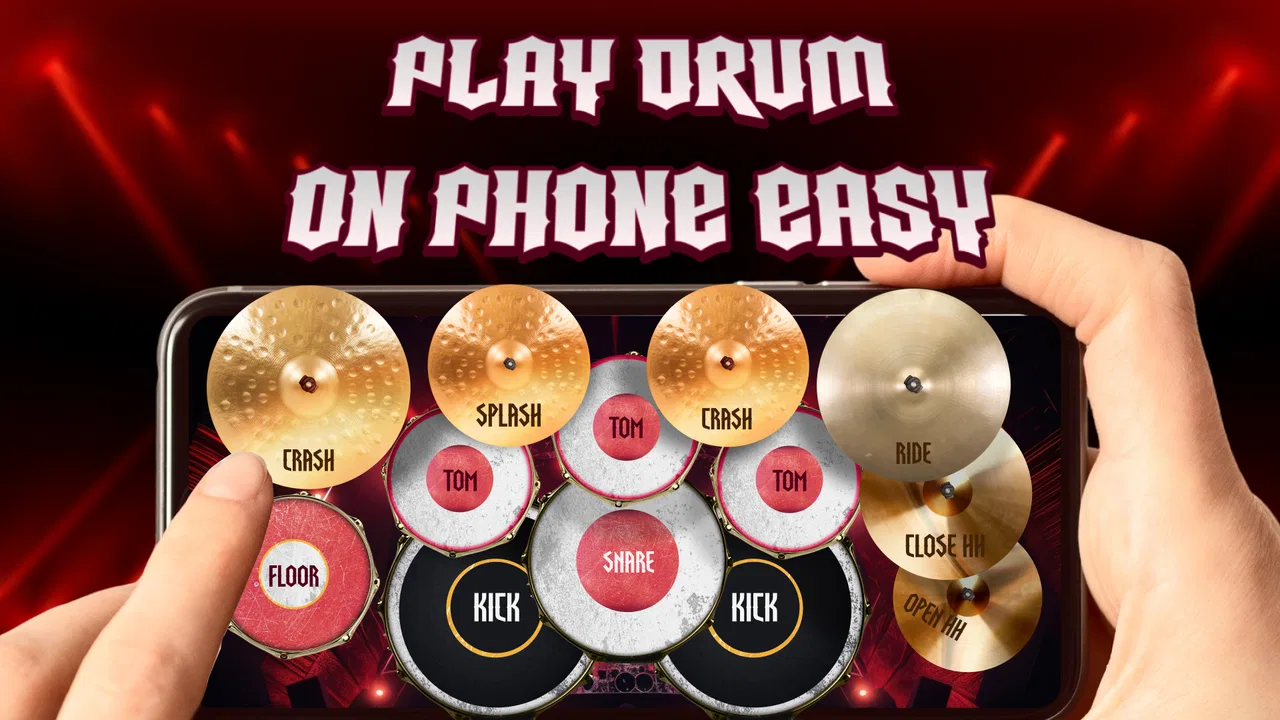
The first thing I liked was the directness of the concept. Instead of opening with an intimidating collection of music-production controls, the app points toward two connected activities: learning drum patterns step by step and making beats with pads. For a newcomer, that matters. A blank sequencer can be confusing because it asks you to understand timing, sound selection, and arrangement before you have built any confidence. A lesson-led approach gives you a starting point.
I found the pad format especially suitable for short sessions. A phone is already something most people keep nearby, so it is easy to practice a basic rhythm while waiting for an appointment, taking a break, or winding down in the evening. I would not treat those sessions as a substitute for structured practice on an acoustic or electronic kit, but they can help develop awareness of pulse and repetition. The low commitment is one of the strongest reasons to install it.
The app is free, which removes the biggest barrier for someone who is simply curious about drums. It is also rated for Everyone, and it requires Android 7.0 or later. In practical terms, that makes it approachable for many Android users, including people who are not carrying a recent flagship phone. I still recommend checking how comfortably the pads fit your screen before committing to longer practice, because touch size and hand position can affect the experience more than a feature list suggests.
Learning first, creating second
The learning side is most useful when you treat each exercise as a small coordination task. Rather than tapping randomly to produce noise, I would begin by identifying the repeating pulse, then focus on one part of the pattern at a time. For example, I might listen for the steady foundation first, add the stronger accents, and only then attempt the complete rhythm. This makes the app more valuable as a practice aid than as a simple sound toy.
A good routine is to repeat a lesson until the hands stop chasing the beat. After that, I would move into the beat-making area and recreate the same idea without relying on the guided sequence. That second step is important because recognition and execution are different skills. A pattern can sound obvious when demonstrated but become surprisingly difficult when you have to place each hit yourself. The transition from copying to constructing is where the app can teach something practical.
There is also a useful confidence benefit for beginners. Physical drums can feel loud, expensive, and demanding of space, while a phone-based pad avoids those obstacles. Someone who is unsure whether they even enjoy rhythm practice can explore the basics without buying equipment. If the experience sparks a serious interest, the user can later move to lessons, a MIDI controller, or an electronic kit with a clearer idea of what they want to learn.
That said, I would not confuse visual tapping with full drumming technique. The app can help with timing and pattern familiarity, but it cannot reproduce the rebound of a drumhead, the foot coordination of a kick pedal, or the physical difference between playing softly and loudly on a real instrument. Those limitations are not deal-breakers; they simply define the right role for the app.
A realistic routine for a busy day
Imagine having ten minutes before leaving for work. I would choose one lesson, listen carefully once, and then repeat it several times without trying to rush. If the pattern starts feeling comfortable, I would switch to the beat-making function and build a short variation by changing one element, such as an accent or a fill. The aim would not be to produce a finished song. It would be to test whether I understood the rhythm well enough to alter it deliberately.
That workflow has a hidden advantage: it turns a short break into a focused exercise rather than passive entertainment. It also gives you a simple way to measure progress without needing a formal practice diary. If you can reproduce the lesson, create a variation, and return to the original pulse without losing time, you have done more than merely tap through a demonstration.
For parents or teachers introducing rhythm to a young learner, the same approach can work in a supervised setting. The Everyone rating supports that broad audience, but I would still guide the session. Children may enjoy the immediate response of the pads while missing the listening part of the exercise. Asking them to count, clap, or describe the repeating pattern before tapping can make the activity more educational.
Where beat creation becomes useful
The beat-making side is most appealing when you use it for sketches. I would use the pads to test a rhythmic idea before opening a larger music app, especially when the goal is to find a basic groove rather than arrange a complete track. A quick pattern can help answer a creative question: does this accent belong on the main pulse, or does it work better as a transition?
This is also a practical way to break creative hesitation. Instead of searching through a large library of sounds or staring at an empty timeline, you can start with a simple physical action. Once a rhythm exists, even a rough one, it becomes easier to decide whether it needs more space, fewer hits, or a stronger ending. The app is therefore more useful as a starting pad than as a final production environment.
My tip is to deliberately leave gaps. Beginners often fill every available moment because tapping feels productive, but silence gives a beat shape. Try making one version with a sparse foundation and another with extra hits, then compare which one is easier to follow. This kind of experiment teaches arrangement instincts that a generic “tap along” experience may not encourage.
Another worthwhile exercise is to create a pattern that is slightly different from the lesson while keeping its underlying pulse. Change only one component at a time. If you alter everything at once, it becomes difficult to know what improved the groove or made it less stable. Small variations are more revealing and can help a learner understand why some rhythms feel settled while others feel crowded.
What has changed and what that means for users
The app was released on September 29, 2025, and the current release is identified as 1.0.9. Those details place it in an early stage of its product life, so I see the present experience as a foundation rather than a finished answer to every drum-learning need. The important point is not to assume that a version number automatically means a major transformation. What I can judge is the current balance between guided learning and pad-based creation, while future improvements remain something to watch rather than something to promise.
For someone installing it now, the practical benefit of the current release is that the core idea is already clear. You do not need to figure out whether it is primarily a lesson app or a beat toy; it attempts to serve both purposes. Existing users should approach updates with realistic expectations. A newer build can refine the experience, but it does not change the physical limits of tapping on a phone or automatically turn a beginner tool into professional music software.
I would pay attention to how future releases handle the connection between lessons and creation. The strongest evolution would be a smoother path from following a pattern to modifying it, because that is where the educational value becomes deeper. Clearer progression, more meaningful practice feedback, and better ways to revisit a pattern would matter more to me than simply adding a larger collection of buttons.
There is a trade-off here for returning users. Simplicity makes the app approachable, but simplicity can also make practice feel repetitive once the novelty wears off. If you already understand basic rhythm, you may quickly want more control over structure and expression. If you are new to drums, the same uncluttered design can be exactly what keeps you from feeling overwhelmed.
Limitations worth considering before installing
The biggest limitation is the touch interface itself. Phone pads can be convenient, but they are not as expressive or dependable as dedicated drum hardware. Finger placement, screen size, and accidental touches all matter. I would be cautious about judging my actual drumming ability from a difficult pattern on a small display. Sometimes the challenge is coordination with the interface rather than coordination with the rhythm.
The app is also unlikely to be the right choice for someone who wants a complete recording workflow. If your priority is multitrack arrangement, detailed editing, external gear, or polished song production, a dedicated digital audio workstation will be a better fit. Those tools take longer to learn, but they are designed for development beyond a short beat sketch. This app makes more sense before that stage, or alongside it.
Experienced players may find the guided material too basic. A drummer looking for advanced independence exercises, nuanced dynamics, or a substitute for rehearsal will probably outgrow it. I would skip it if you already own an electronic kit and need realistic practice feedback. The phone format cannot provide the same physical response, and no amount of convenient access changes that.
There is a different kind of limitation for completely casual users: the learning focus may be more structure than they want. If you only want to trigger sounds for a few seconds, a simple soundboard may feel quicker. The value here comes from repeating patterns, listening closely, and making intentional changes. Without that willingness to practice, the app can become a novelty rather than a useful habit.
How it compares with familiar alternatives
Compared with a physical drum kit, this app wins on cost, portability, and quiet practice. It loses on feel, expressiveness, and the ability to develop full-body technique. Compared with a MIDI pad controller, it is easier to start because you already have the phone, but the controller offers better spacing and more reliable simultaneous play. Compared with a full music-production app, it is less flexible but much less intimidating.
For learning rhythm from scratch, I would choose this app before a complicated workstation because the first decision is simply what to tap and when. For producing a finished track, I would move in the opposite direction and use a more complete tool. For serious drumming development, I would combine a digital lesson source or instructor with real practice equipment, using this app only for quick pattern work when a kit is unavailable.
The best comparison is therefore not “which app has the most features?” It is “which problem am I trying to solve today?” If the problem is finding a friendly entry point, practicing a short pattern quietly, or turning a rhythmic idea into a rough sketch, this app is well matched. If the problem is recording an entire song or improving hand technique on real surfaces, another option is clearly better.
Who should use it and how to get more from it
I recommend it to beginners who need a gentle introduction, casual musicians who want a portable rhythm tool, and creators who like testing grooves before developing them elsewhere. It can also suit someone who is curious about drums but is not ready to buy equipment. The free price makes that experiment particularly easy, and the broad age rating keeps the audience open.
To get more from it, I would avoid jumping immediately between every available exercise. Pick one pattern and stay with it long enough to notice its structure. Count the pulse quietly, tap with consistent spacing, and then make one controlled change in the beat maker. That sequence turns the app into a small learning loop: hear, copy, understand, alter, and repeat.
I would also use headphones when the surrounding environment is noisy, not because the app needs a studio setup, but because rhythm is easier to judge when the sounds are clear. Keep sessions short enough that accuracy remains more important than speed. If your taps become frantic, slow down and rebuild the pattern from its simplest layer.
The most useful mindset is to treat the app as a rhythm notebook, not a virtual drum kit. That distinction prevents disappointment and highlights what it does well. It gives you a place to capture ideas, practice basic patterns, and build confidence without demanding equipment or a large time commitment.
My recommendation after using it
Learn Drum - Beat Maker & Pad is a worthwhile free download for people at the beginning of their drum journey or anyone who wants a compact beat-making companion. SCA Software has chosen a sensible combination: lessons provide direction, while the pads give users room to experiment. The current release feels most successful when those two sides are used together rather than treated as separate features.
I would recommend starting with a clear goal instead of expecting endless entertainment. Use it to learn one rhythm, recreate it, and make a small variation. That workflow reveals the app’s real strength and also makes its limitations easier to accept. It will not replace an instrument, a teacher, or a full production environment, but it can make rhythm practice more approachable and more available during ordinary parts of the day.
My final view is that this is a good first step, a useful sketchpad, and a convenient backup practice tool. It is not the right destination for advanced drummers or serious producers. If you understand that boundary, the free access, approachable format, and focused purpose make it easy to recommend to a friend who wants to learn drums without starting with expensive gear or complicated software.
FAQs for Learn Drum - Beat Maker & Pad
01What features does Learn Drum - Beat Maker & Pad offer?
Learn Drum - Beat Maker & Pad provides an interactive platform for learning and creating drum beats. It includes tutorials for beginners, a variety of drum kits, and a beat-making pad for crafting your own rhythms. Users can also access a library of sounds and tracks to enhance their creations.
02Is Learn Drum - Beat Maker & Pad suitable for beginners?
Yes, the app is designed with beginners in mind. It features step-by-step tutorials and easy-to-follow lessons. The user-friendly interface allows newcomers to grasp the basics of drumming and beat-making without feeling overwhelmed, making it an excellent starting point for aspiring drummers.
03Can I use Learn Drum - Beat Maker & Pad without an internet connection?
While an internet connection enhances the app experience by providing access to additional content and updates, the core features of Learn Drum - Beat Maker & Pad can be used offline. This allows users to practice and create beats anywhere, even without internet access.
04Are there in-app purchases in Learn Drum - Beat Maker & Pad?
Yes, the app includes in-app purchases. While the basic features are free, users can purchase additional drum kits, sound packs, and premium tutorials. These purchases enhance the learning and creative experience but are not mandatory for enjoying the app's core functionalities.
05How does Learn Drum - Beat Maker & Pad compare to other music apps?
Learn Drum - Beat Maker & Pad stands out due to its focus on drumming and beat creation. Unlike general music apps, it provides specialized tools and tutorials for drummers of all levels. Its intuitive design and educational resources make it a strong choice for both learning and creating drum-based music.
Pros
- Intuitive interface for beginners.
- Wide range of drum kits available.
- Customizable sound settings.
- Interactive tutorials included.
- Offline mode for practice anywhere.
Cons
- Limited free version features.
- Occasional app lag on older devices.
- In-app ads can be intrusive.
- Sound quality varies by device.
- No export feature for created beats.

Learn Drum - Beat Maker & Pad
Gallery